Venkateshwara lyrical video editing Bgm259 BGM259
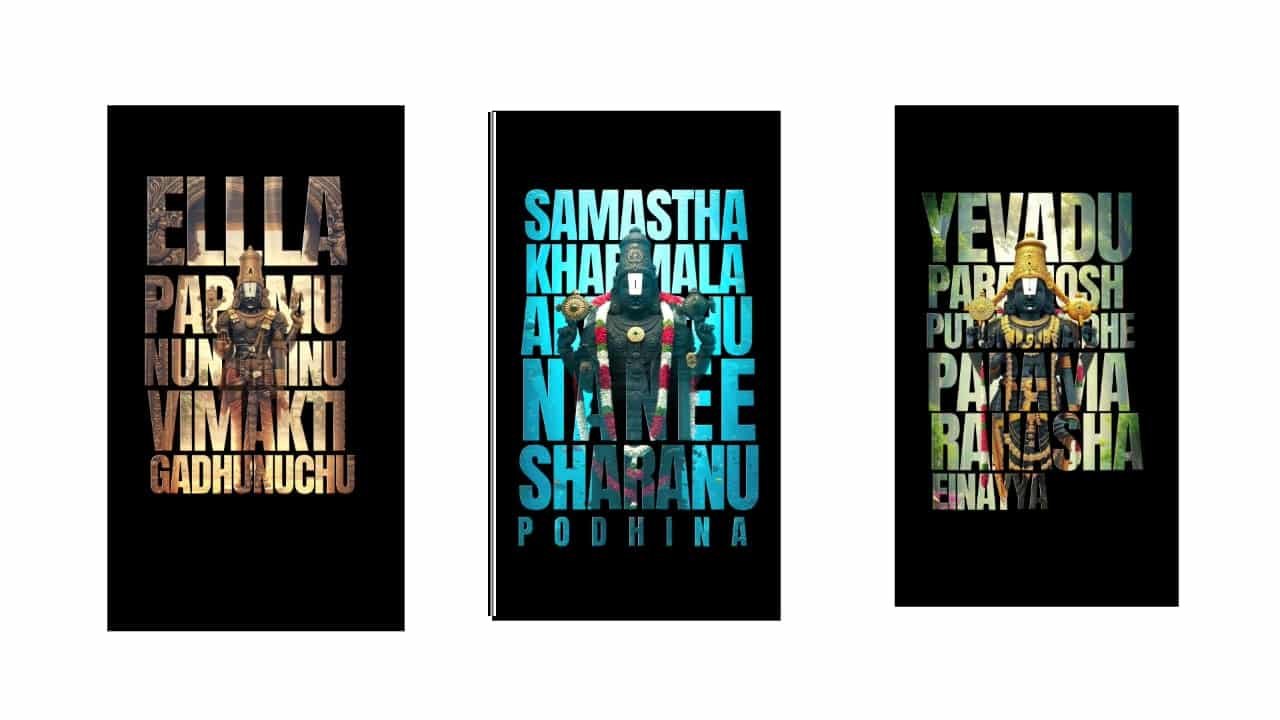
Venkateshwara Lyrical Video Editing – Divine Mobile Creation
Venkateshwara lyrical video editing is a devotional and visually rich style that blends powerful spiritual lyrics with smooth visuals and traditional background music. This type of editing is widely used during festivals like Brahmotsavam, Vaikunta Ekadasi, or even for daily devotional sharing on Instagram, YouTube Shorts, and WhatsApp status. With mobile editing apps like Alight Motion, CapCut, or KineMaster, you can create a peaceful and divine lyrical video right from your phone.
Begin by selecting a devotional song or slokam dedicated to Lord Venkateshwara. Choose lyrics that are soothing, emotional, and filled with bhakti — for example, “Govinda Govinda,” “Tirumala Vasa,” or classical songs like “Srinivasa Kalyanam.” The song should have a calm rhythm and devotional vibe that sets the spiritual tone for your edit.
Open your editing app and create a 9:16 vertical project suitable for Reels and Shorts. Start with a temple background — an image or video of Tirumala temple gopuram, Venkateshwara Swamy idol, or golden surroundings. Apply a slight blur and vignette to give focus to the center visuals. You can also use subtle glowing overlays like diyas, light rays, or floating gold particles for a divine effect.
Now import your main visuals — these can include slow pans of Venkateshwara Swamy images, devotees praying, or even symbolic elements like bells, lamps, and flowers. Use slow motion and smooth transitions to keep the edit peaceful and meditative.
Type the lyrics of the devotional song line by line. Use a sacred-looking font, such as Devanagari script or traditional Telugu fonts if using Telugu lyrics. Keep the text white or golden with a soft glow or shadow behind it to improve visibility. Place each line carefully so it doesn’t block the deity’s face. Use slow fade-ins, float-ups, or typewriter effects to animate the text gently.
To enhance the spiritual feel, apply warm color grading. Use golden tones, light pink, and soft white. Avoid overly saturated or dark filters — keep the visuals glowing and clean. Add light leak overlays or sunrays near the deity’s crown to give a cinematic devotional glow.
During lyrical pauses or beats, insert frames with divine quotes like “Om Namo Venkatesaya” or “Govinda Hari Govinda.” Add temple bell sounds or background chants subtly in the audio to boost bhakti feel. Make sure the transitions are soft — use dissolve, fade, or zoom transitions between scenes or lyric changes.
If you want to add a motion background, you can insert a looping video of moving clouds, glowing diyas, or falling temple flowers behind your main visuals. Use blend modes like “Overlay” or “Screen” to integrate them without overpowering the deity.
End the video with a strong closing visual of the Venkateshwara idol, add final lyrics like “Saranam Venkatesha” or “Tirupati Balaji Ki Jai,” and let the music fade out softly. Hold the final frame for a second or two for devotional impact.
Export in 1080p quality, check all text sync with the lyrics, and ensure everything flows smoothly. When uploading, keep the caption simple and spiritual to match the tone of the video.
Venkateshwara lyrical video edits aren’t just trending — they’re a heartfelt way to show devotion using the power of visuals and sound. With the right song, respectful presentation, and cinematic style, your video becomes a modern expression of timeless faith.
Full project
Xml
Song


















Post Comment