3D Wedding invitation video editing in Alight Motion BGM270 bgm270
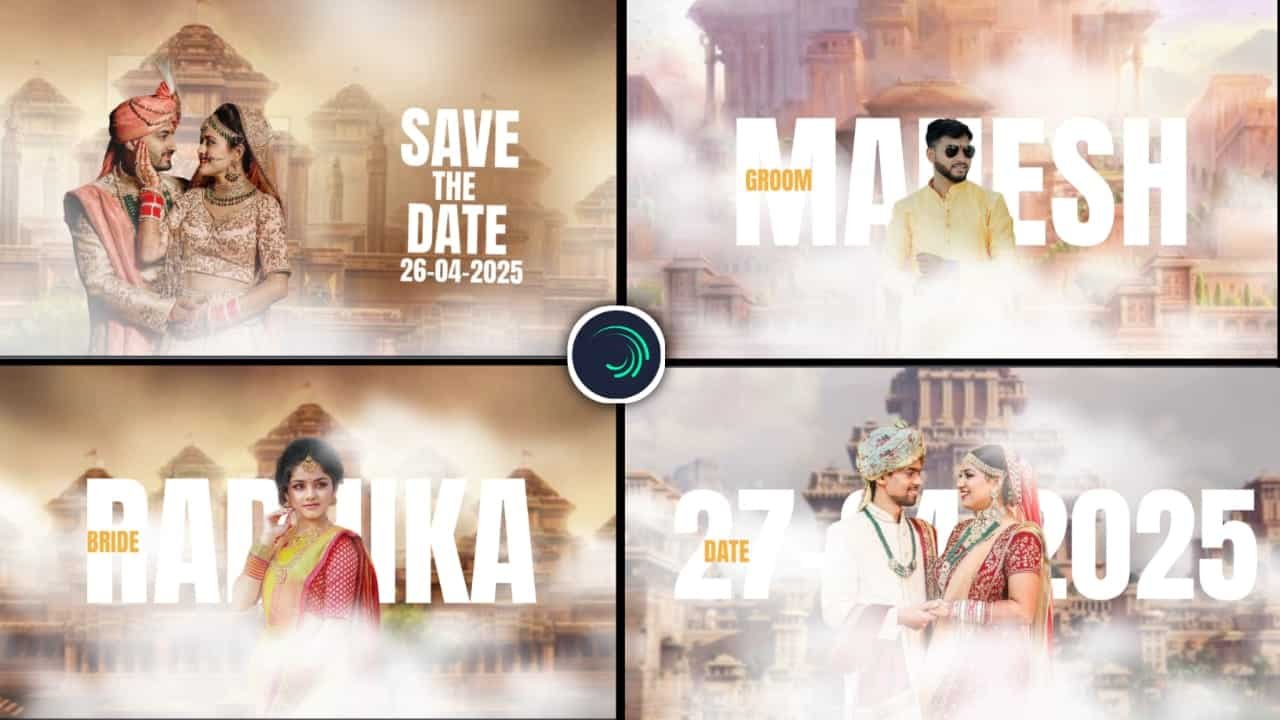
3D Wedding Invitation Video Editing in Alight Motion
Creating a 3D wedding invitation video is an exciting and modern way to invite friends and family to celebrate your special day. Instead of traditional paper invitations, a digital invitation in the form of a 3D animation can leave a lasting impression on the recipients. With mobile apps like Alight Motion, you can easily create stunning 3D effects for your wedding invitation video, even if you’re not a professional designer.
Alight Motion is a powerful mobile editing app that lets you create animated videos with high-quality effects and transitions. It is especially useful for creating dynamic wedding invitations that stand out. In this guide, we will walk you through the process of editing a 3D wedding invitation video using Alight Motion to make your big day even more special.
Getting Started with Alight Motion
Before diving into the creation process, ensure you have Alight Motion installed on your device. Once you’re ready, follow these steps to get started:
Open Alight Motion: Launch the Alight Motion app on your mobile device. Start a new project by selecting the aspect ratio suited for video invitations (typically 1920×1080 for a horizontal video or 1080×1920 for vertical).
Set Your Background: For a wedding invitation, choose a romantic background to set the tone. You can either import a beautiful wedding background image (such as flowers, wedding rings, or a soft pastel-colored backdrop) or opt for a solid color or gradient background for a minimalist look.
Creating 3D Text and Elements
Now that you have your background ready, it’s time to add the 3D elements that will make your wedding invitation stand out. Alight Motion has several tools to create and animate text and objects in a 3D space.
Add 3D Text:
- Tap on the “+” icon to add a new text layer.
- Write your wedding details like “You’re Invited,” or the names of the couple and the wedding date.
- Choose a beautiful font that matches the theme of your wedding (such as elegant cursive or bold, modern fonts).
- To give it a 3D effect, go to the layer properties and adjust the shadow settings to make the text appear elevated. You can also use the 3D rotation feature to make the text look like it’s spinning or coming into view from different angles.
- Apply a glow effect or a soft gradient fill to make the text more visually appealing.
Adding 3D Shapes and Elements:
- You can add shapes like circles, hearts, or wedding-themed objects to give depth to the invitation.
- Use the 3D transformation tools to make these objects appear to float in space or move around the screen.
- For example, you can add animated rings that spin or fly in from the sides, representing the wedding rings.
- To create a smooth 3D effect, use the scale and rotation tools to animate these elements.
Animating the Invitation
Animation is key when creating a 3D wedding invitation video. Adding movement to the text, background, and objects will make the video more engaging.
Animate the Text:
- Select your text layer and use keyframes to animate it. For example, you can make the text fade in from the background or fly in from the sides.
- For a dramatic effect, try animating the text in a 3D rotation or zoom-in effect, which makes it appear as if the text is coming closer to the viewer or rotating in space.
Animate Objects and Background:
- Add subtle animations to your background as well. For instance, you can add a slight zoom-in effect or animate the background with flowing lights or glitter to enhance the festive atmosphere.
- For added flair, use the path animation feature to animate objects, like hearts or rings, following a specific route across the screen. This gives the invitation a dynamic feel.
Add 3D Transition Effects:
- To make your wedding invitation even more impressive, use 3D transition effects to introduce new elements or scenes. For example, you can use a fade-out and fade-in transition that rotates the text as it changes scenes.
- You can also add slide transitions where objects or text slide in and out in a 3D manner to keep the invitation flowing smoothly.
Adding Music and Sound Effects
A wedding invitation video is not complete without the right background music. Adding romantic music or a soft melody can set the tone for the event. Alight Motion allows you to import music and sound effects to complement your video.
Import Music: Tap on the “+” icon to import music from your library. Choose a romantic or classical track that fits the mood of your wedding invitation. Make sure the music is soft enough to not overpower the visuals but still sets the right atmosphere.
Add Sound Effects: For added emphasis, you can include soft sound effects like chimes, soft bells, or even voiceovers. These can play when key elements appear in the video, such as when the couple’s names are revealed or when the wedding date is announced.
Final Touches and Exporting the Video
Once you’ve finished adding all the animations, text, music, and effects, it’s time to finalize your wedding invitation video.
Preview the Video: Before exporting, preview your video to ensure that everything flows smoothly and looks as expected. Adjust the timing and spacing of the animations to ensure they’re synchronized with the music.
Add a Final Message: At the end of your video, you can include a personal message or a call-to-action like “Join us on our special day!” or “Save the date!” This is a great way to wrap up the invitation and provide the necessary details.
Export the Video: Once you’re satisfied with the final result, export your video in high quality. Tap on the export button, and select 1080p resolution for the best video quality. Make sure you select the appropriate format (usually MP4) for sharing across social media platforms like Instagram, WhatsApp, or even for email.
Conclusion
Creating a 3D wedding invitation video in Alight Motion is a fantastic way to give your wedding a modern and personalized touch. With the app’s powerful features, including 3D text, transitions, animations, and music, you can craft an unforgettable wedding invitation that stands out. Whether you’re looking to impress your guests with a dynamic video or simply want to make your special day memorable, Alight Motion offers everything you need to make your wedding invitation truly unique. So, get creative and let your wedding invitation shine!
Full project
Xml
Song


















Post Comment