Trending EFX Video Editing in Alight motion Attitude status editing Instagram trending video edit 29jun2

Welcome to our website samthoshrcf.com new trending photo movement video 3d video editing in alight motion let’s see how to edit this video.
OPEN ALIGHT MOTION
This video I edited using alight motion if you want this apk join our telegram channel and get latest version alight motion apk. and i given this website kinemaster preset also you using kinemaster import kinemaster preset. Now open alight motion after click plus icon select 9:16 ratio 60fps after click create project option now select your image after zoom full screen and adjust perfectly click share icon select current frame as png option. same process you crop 13 images before start editing.
FULL PROJECT PRESET
Enable Camera movement ⬇️
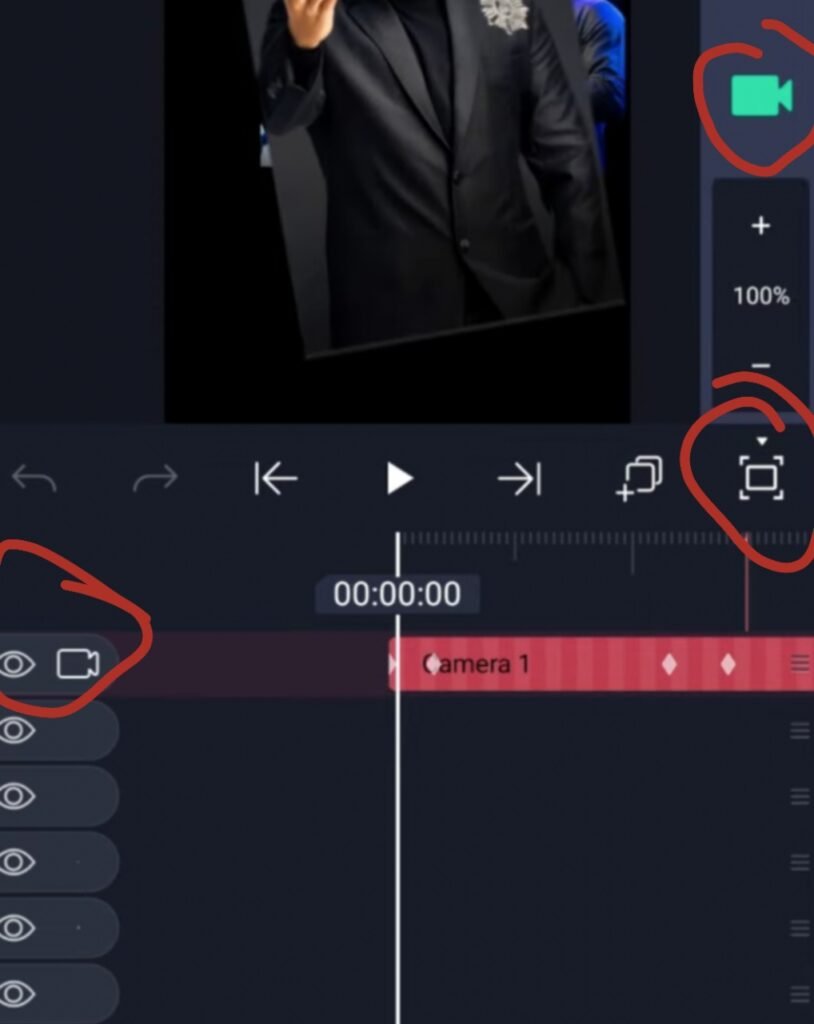
after go back and clear all background apps after open alight motion click three lines enable low quality preview after open full project enable camera now just you replace with croped images select image after click color & fill option select your 9:16 ratio image after select another layer click color & fill option select your image after click another image layer go to color & fill option replace with your image same process replace all images. Video editing is completed thanks for visiting our website santhoshrcf.com
All Meterials Links
►Kinemastar Preset Link
DOWNLOAD NOW
►Beat Mark project preset :
DOWNLOAD NOW
►Beat Mark XML file LINK :-
DOWNLOAD NOW
►Shake effect Preset LINK
DOWNLOAD NOW
►Shake effect XML LINK
DOWNLOAD NOW
► Video All photo LINK
DOWNLOAD NOW
► Song Download Link
DOWNLOAD NOW


















Post Comment