Alight Motion New Style Trending Video Editing in Mobile Trending attitude status editing trending 27jun1

Hi friends this is santhosh from rcf creations guruji today i edited instgram trending volume bar loading video editing in alight motion.
OPEN BEAT MARK
first import beat mark project before importing beat mark download font and import in alight motion. under this website i given loading video link click plus icon go to media option after select downloaded video after go blending select lighten click screen option.trim extra part in next red mark area. after select loading video click effects option add exposure/ Gamma Effect Increase exposure. after click plus icon go to media option now add four image 9:16 ratio select image.
After zoom full screen trim extra part in next redline after add another image zoom full screen trim extra part in next red mark area after go to 09:15 seconds now add regular images any ratio add images here but , starting four images 9:16 compulsory add all images.
EFFECT EDITING
1. Motion Blur
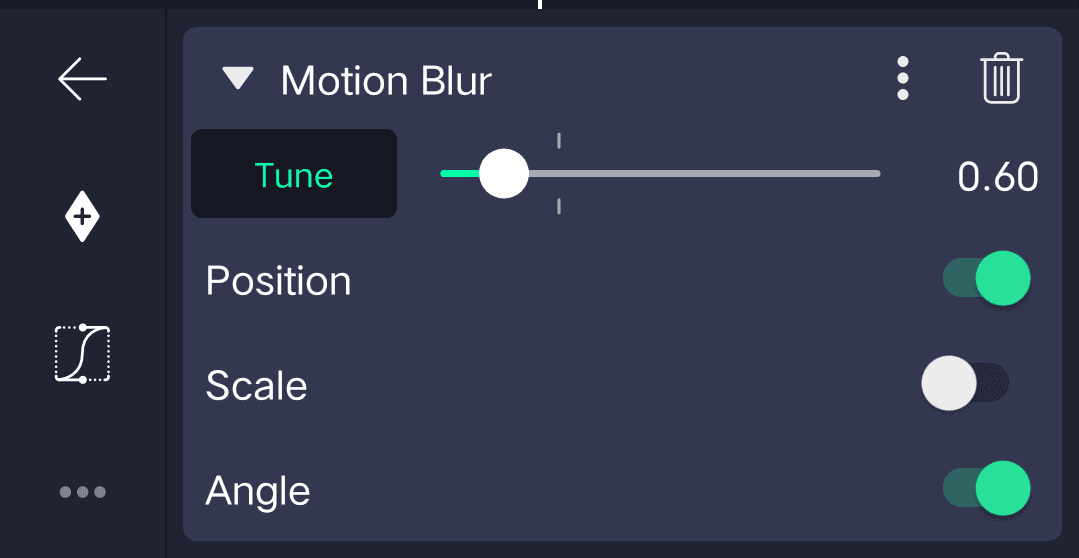
2. Directional Blur
- Strength Add key frame in starting adjust 0.65 two seconds after add key frame adjust 0.00 three seconds after add key frame
- Angle 90°
3. RGB Split
- Strength add key frame in starting adjust 0.10 four seconds after add key frame 0.00
4. Oscillate
- Frequency 2.00hz
- Magnitude add key frame starting adjust 304.0 5 seconds after add key frame 1.0
5. Pulse size
- Frequency add key frame starting adjust 16.00Hz
- Glow 1.06
Effect is completed copy this effects after open beat mark project paste this effects all images select image after click effects option click three dots press paste effects same process add this effects all images after click share icon select High quality click export button all meterials ⬇️ THANKS FOR VISITING
ALL Meterials Links
►Kinemastar Preset Link
DOWNLOAD NOW
►Beat Mark project preset :
DOWNLOAD NOW
►Beat Mark XML file LINK :-
DOWNLOAD NOW
►Shake effect Preset LINK
DOWNLOAD NOW
►Shake effect XML LINK
DOWNLOAD NOW
► Video All photo LINK
DOWNLOAD NOW
► Song Download Link
DOWNLOAD NOW


















Post Comment